Coffee Loyalty Card: The 2026 Guide for Cafe Owners
Create a digital coffee card for your cafe in 5 minutes. Compare paper vs digital loyalty cards, see real examples, and boost repeat visits by 25%+.
Key Takeaway: A coffee loyalty card rewards customers for repeat visits, typically offering a free drink after collecting stamps. Digital cards in Apple/Google Wallet get 25%+ more usage than paper because customers always have their phone.
FaveCard Team
Published January 10, 2026 · Updated February 18, 2026
A coffee loyalty card rewards customers for repeat visits, typically offering a free drink after collecting stamps. Digital cards in Apple/Google Wallet get 25%+ more usage than paper because customers always have their phone.
Key Takeaway: Digital loyalty cards eliminate the “forgot my card” problem entirely. Your regulars collect stamps every visit because their phone is always with them.
Why Coffee Shops Need Loyalty Cards
Coffee is a habit. Your regulars come back 3-5 times per week. A loyalty card gives them a reason to choose your cafe over the competition.
The numbers are clear:
- 84% of consumers stick with brands that offer loyalty programs (Bond Brand Loyalty)
- Increasing retention by just 5% can boost profits by 25-95% (Bain & Company)
- Loyal customers are 64% more likely to purchase more frequently (McKinsey)
For a cafe serving 100 customers per day, even a 10% increase in repeat visits means 300+ extra transactions per month.
Paper vs Digital: The Real Comparison
Most cafes start with paper stamp cards. They’re cheap to print and familiar to customers. But they have serious problems.
| Factor | Paper Cards | Digital Cards |
|---|---|---|
| Cost | $50-200/year printing | $0 (Free) – $19/mo (Pro), no printing |
| Lost cards | 20-30% never completed | 0% - always on phone |
| Customer data | None | Full visit history |
| Updates | Reprint everything | Instant, automatic |
| Reminders | None | Push notifications |
| Professional look | Basic | Branded, modern |
The biggest difference? Paper cards get lost. Digital cards live in Apple Wallet or Google Wallet - right next to credit cards and boarding passes. Customers can’t forget them.
How Digital Coffee Loyalty Cards Work
Here’s the customer experience with a digital loyalty card:
- Customer scans QR code at your counter (or clicks a link on social media)
- Card adds to their Wallet with one tap - no app download, no signup
- Staff scans their card to add stamps (takes 2 seconds)
- Customer gets notified when they’re close to a reward
- Reward redeemed automatically when they hit the stamp count
From the cafe owner’s side, you see:
- Who has cards (names, not just numbers)
- When they visit
- How many stamps they have
- Which rewards they’ve claimed
This data helps you understand your regulars and reward your best customers.
Coffee Card Design: What Your Customers See
Your loyalty card is a tiny billboard that lives in your customer’s phone. It sits right next to their credit cards and boarding passes in Apple Wallet or Google Wallet. So it better look good.
The Wallet Card Layout
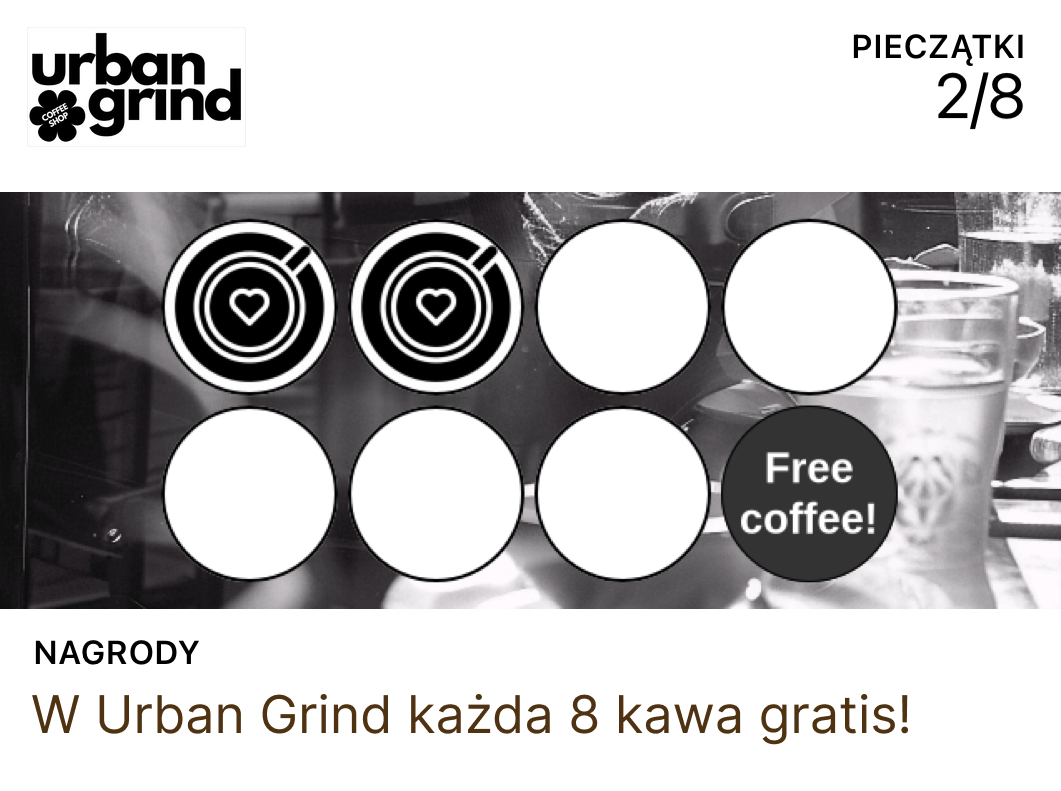
When a customer opens their card, they see:
- Your logo at the top - this is the first thing they notice
- Card name - usually your cafe name + “Loyalty”
- Stamp progress - how many stamps they have vs. how many they need
- Reward text - what they get when they fill the card (“Free coffee of your choice”)
- QR code - staff scans this to add stamps
The card also shows on the lock screen when they’re near your cafe (if they have location services on). That’s a free reminder to stop in.
Good Design vs. Bad Design
Good card design:
- Uses your actual cafe colors (not random defaults)
- Logo is clear and readable at small size
- Stamp icon matches your brand (coffee cup, bean, mug)
- Reward text is short and specific (“Free large coffee” not “Complimentary beverage of your choosing”)
- Clean, uncluttered look
Bad card design:
- Generic template with no customization
- Blurry or tiny logo
- Default stamp icon that has nothing to do with coffee
- Long, confusing reward description
- Too many colors competing for attention
Matching Your Cafe Brand
Your loyalty card should feel like it belongs to your cafe. A few tips:
- Pull your two main brand colors from your signage or menu. Use one for the background, one for accents.
- Keep your logo simple. If your full logo is too detailed, use a simplified version or just the icon.
- Pick a stamp icon that fits. A coffee cup works for most. Some cafes use beans, hearts, or their logo mark.
- Write your reward in your voice. If your cafe is playful, “Grab your free cuppa!” works better than “Redeem complimentary beverage.”
With FaveCard, you preview everything in real-time before publishing. What you see in the editor is exactly what your customers see in their Wallet.
Where to Display Your QR Code
Your QR code is the front door to your loyalty card. Put it everywhere customers might see it.
Counter Display (Most Important)
This is where 80% of signups happen. Place your QR code at eye level where customers wait for their order. A small acrylic stand works great. Staff can point to it: “Scan that for a free loyalty card - free coffee after 8 stamps.”
Menu Board
Add a small QR code to the corner of your menu board with text like “Scan for loyalty card.” Customers stare at the menu while deciding - give them something else to do.
Receipt Printing
If your POS supports it, print the QR code on receipts. It’s a second chance for customers who didn’t sign up at the counter.
Table Tents
For cafes with seating, table tents work well. Customers sitting down with their coffee have time to scan. Keep the message simple: “Join our loyalty card. Free coffee after 8 stamps.”
Social Media
- Instagram bio - Add your card link. One tap from their phone and the card is in their Wallet.
- Google Business profile - Add the link to your “Updates” or description. People finding your cafe on Google Maps can grab the card before they even visit.
- Facebook page - Pin a post with the QR code or link.
Window or Door Sticker
A QR code sticker on your front door or window catches people walking by. “Regulars get free coffee” with a QR code is a simple pitch.
The more places you put it, the more cards you issue. And every card issued is a customer who’s now motivated to come back.
What Makes a Good Coffee Loyalty Card?
The best coffee loyalty cards share these traits:
1. Simple Reward Structure
Don’t overcomplicate it. “Buy 8, get 1 free” is clear. Complex point systems confuse customers and staff.
Good examples:
- 8 stamps = free coffee
- 10 stamps = free drink of choice
- 6 stamps = 50% off any pastry
2. Achievable Goals
If it takes 20 visits to earn a reward, customers lose interest. Keep it between 6-10 stamps. You want them to see progress.
3. Visible Progress
Digital cards show exactly how many stamps remain. Paper cards work too, but digital adds notifications: “2 more stamps until your free coffee!“
4. Branded Design
Your loyalty card represents your cafe. Use your colors, logo, and a stamp icon that matches your vibe. FaveCard lets you customize everything in the card creator.
Real Examples: Coffee Loyalty Cards That Work
The Classic: 8 Stamps, Free Coffee
Most popular structure. Customer buys 8 drinks, gets the 9th free. Simple math, easy to explain, reasonable timeline (2-3 weeks for daily visitors).
Cost to you: ~$3-4 per reward (one drink) Value to customer: Feels like 10%+ discount Result: Guaranteed repeat visits to complete the card
Looking for tiered rewards or points systems? See our coffee shop loyalty program guide for a full comparison of program types.
How to Create Your Coffee Loyalty Card (5 Minutes)
With FaveCard, setup takes about 5 minutes:
- Sign up at favecard.co (free forever)
- Choose your card style - colors, background, stamp icon
- Upload your logo - appears on the card
- Set stamp count - we recommend 8 for coffee shops
- Write your reward - “Free coffee of your choice”
- Get your QR code - print it or share the link
That’s it. No app for customers to download. No hardware to buy. Just a QR code that adds cards to Apple/Google Wallet.
Getting Customers to Use Your Card
Having a loyalty card doesn’t help if customers don’t know about it. Want a full loyalty program strategy beyond the card? See our complete coffee shop loyalty program guide.
Here’s what works beyond just placing QR codes (covered above):
Train Your Staff
Your baristas are your best marketing channel. A simple “Would you like to start a loyalty card? Free coffee after 8 stamps” at checkout converts better than any sign. Make it part of the routine for new faces.
First-Stamp Bonus
Start new customers with 1-2 stamps already filled. It triggers the “endowed progress effect” - people are more likely to complete something they’ve already started.
Measuring Success
Digital loyalty cards give you data paper never could:
Track these numbers:
- Cards issued this week/month
- Stamps given per day
- Rewards redeemed
- Repeat visit rate
FaveCard shows all this in your dashboard. You’ll see patterns like “Tuesdays are slow” or “This regular hasn’t visited in 2 weeks.”
Common Mistakes to Avoid
Mistake 1: Too Many Stamps
20 stamps to earn a reward? Customers will give up. Keep it under 10.
Mistake 2: Complicated Rules
“Double stamps on Tuesdays, excludes specialty drinks, minimum $5 purchase…” - too confusing. Simple rules get used.
Mistake 3: Forgetting to Promote
A loyalty card in a drawer helps no one. Put the QR code everywhere. Mention it to every new customer.
Mistake 4: Ignoring the Data
Digital cards tell you who your regulars are. Use that information. Notice someone hasn’t visited in a while? That’s a win-back opportunity.
The Bottom Line
A coffee loyalty card is one of the simplest ways to increase repeat visits. The difference between paper and digital comes down to this:
Paper cards: Cheap to start, but customers lose them and you get zero data.
Digital cards: Free with FaveCard’s Free plan, customers always have them, you see who comes back and when.
For a cafe with 100+ daily customers, even a 10% improvement in repeat visits pays for a digital card many times over.
Running a cafe with food on the menu? See our cafe loyalty program guide for points-per-dollar setups that work for bakeries and brunch spots.
Related Guides:
- Choose the right loyalty program for your coffee shop — Strategy, ROI, and launch plan
- Cafe loyalty programs for food + drinks — Points systems for bakeries and brunch spots
- 15 Coffee Shop Marketing Ideas — Beyond loyalty: Google, Instagram, promotions, and more
Ready to Create Your Coffee Loyalty Card?
FaveCard lets you create a branded digital loyalty card in 5 minutes. Customers add it to Apple/Google Wallet with one tap. You see exactly who’s coming back.
Create your free loyalty card — free forever, no credit card needed.
FAQ
How much does a coffee loyalty card cost?
Paper cards cost $50-200/year in printing. FaveCard has a Free plan ($0 forever) with digital stamp cards, Apple & Google Wallet, and unlimited customers. Pro starts at $19/month for full branding control and customer data access.
Do customers actually use digital loyalty cards?
Yes. Digital cards in Apple/Google Wallet have 25-40% higher usage rates than paper because customers always have their phone. No app download required.
Can I create a coffee loyalty card without technical skills?
Absolutely. With FaveCard, you choose colors, upload your logo, set stamp count and rewards. The whole process takes about 5 minutes. No coding needed.
What’s better: paper stamps or digital loyalty cards?
Digital cards win on every metric: no printing costs, customers can’t lose them, you get visit data, and cards update automatically. Paper cards get lost, damaged, or forgotten.
How do I give stamps with a digital loyalty card?
Your staff uses the FaveCard app to scan the customer’s card (QR code in their Wallet). One tap adds a stamp. Takes about 2 seconds per customer.
Frequently Asked Questions
How much does a coffee loyalty card cost?
Paper cards cost $50-200/year in printing. FaveCard has a Free plan ($0 forever) with digital stamp cards, Apple & Google Wallet, and unlimited customers. Pro starts at $19/month for full branding control and customer data access.
Do customers actually use digital loyalty cards?
Yes. Digital cards in Apple/Google Wallet have 25-40% higher usage rates than paper because customers always have their phone. No app download required.
Can I create a coffee loyalty card without technical skills?
Absolutely. With FaveCard, you choose colors, upload your logo, set stamp count and rewards. The whole process takes about 5 minutes. No coding needed.
What's better: paper stamps or digital loyalty cards?
Digital cards win on every metric: no printing costs, customers can't lose them, you get visit data, and cards update automatically. Paper cards get lost, damaged, or forgotten.
How do I give stamps with a digital loyalty card?
Your staff uses the FaveCard app to scan the customer's card (QR code in their Wallet). One tap adds a stamp. Takes about 2 seconds per customer.